
Your passwords and notes,
finally in one place.
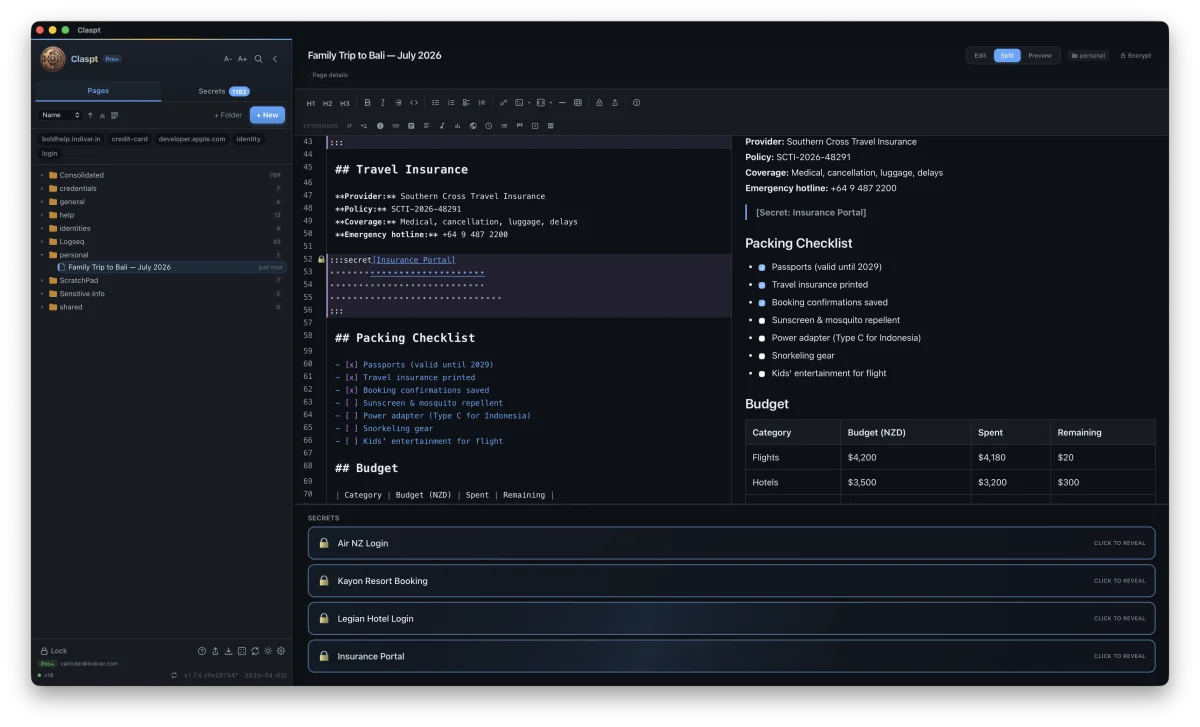
Claspt is a password manager and a notes app combined. Store passwords, write notes, and lock the sensitive parts -everything stays on your computer, not in the cloud. Free forever.
 Verified by Microsoft · auto-updates
 Free forever on desktop. No account required. No credit card.
New here? Not sure what a "vault" or "encryption" means?
We have a simple, jargon-free page that explains what Claspt does in plain English. No technical knowledge needed.
Desktop is the main app. Browser & mobile are helpers.
Everything starts on the desktop app. The browser extension and mobile app connect to it.
You're juggling too many tools.
Passwords in one app. Notes in another. Important stuff scattered across Slack messages, emails, and random files. Sound familiar?
Passwords in one app, notes in another
Your notes are in one app, your passwords in another. When you need both together -like login details next to setup instructions -you end up copy-pasting between tools.
Rigid forms that don't fit your life
Password managers give you rigid forms -username, password, URL. But what about WiFi passwords with notes about the router? Software license keys? Recovery codes with instructions on when to use them?
Proprietary lock-in
Your data is trapped in someone else's format, on someone else's server, behind someone else's subscription. Export is an afterthought, if it exists at all.
Notes and passwords, side by side.
Write Notes Like You Normally Would
A clean, distraction-free editor for any kind of note -meeting notes, project plans, journal entries, recipes, or technical documentation. Formatting is simple and visual, with support for headings, bold, links, tables, checklists, and more.
- Rich text formatting -headings, bold, links, images
- Tables, checklists, and callout boxes
- Code blocks with syntax highlighting
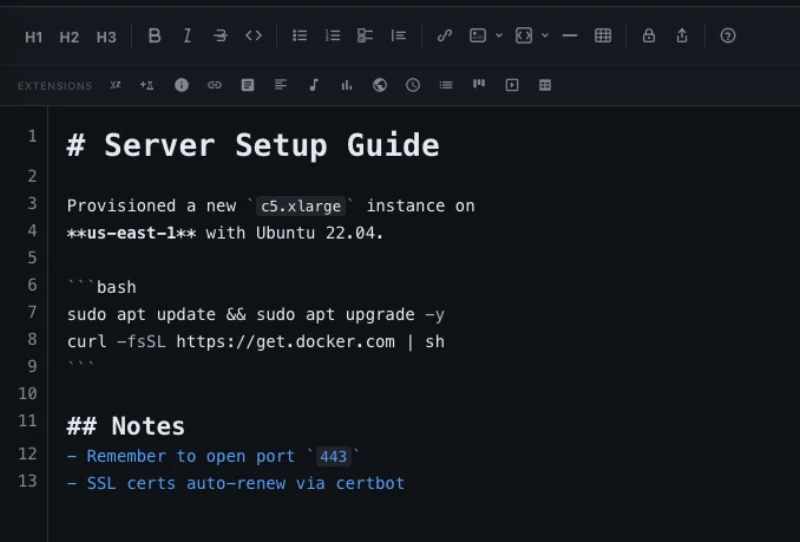
Lock Any Part of Your Notes
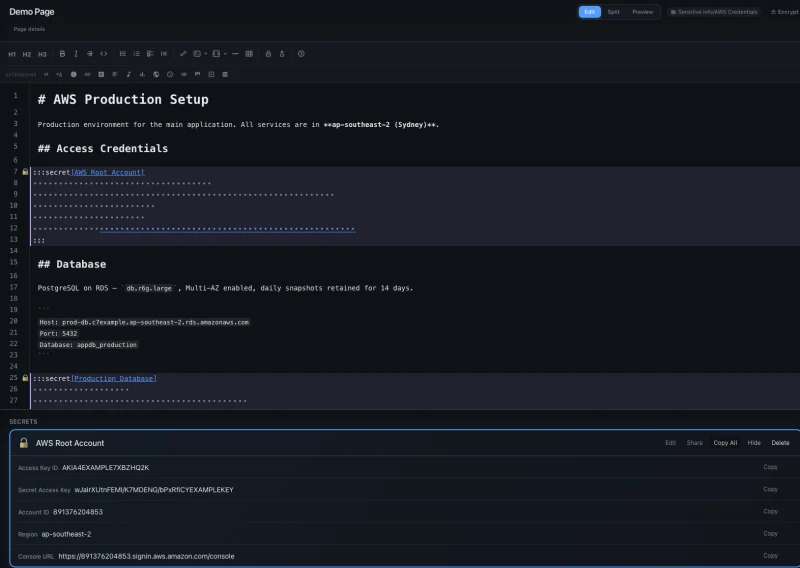
Add a password, credit card number, or any sensitive info right inside your notes. The locked parts are encrypted and hidden -only you can reveal them with your fingerprint or master password. Your notes stay readable. Your secrets stay private.
- Bank-grade encryption on every locked item
- Unlock with fingerprint, Face ID, or your master password
- Flexible fields -not rigid username/password forms
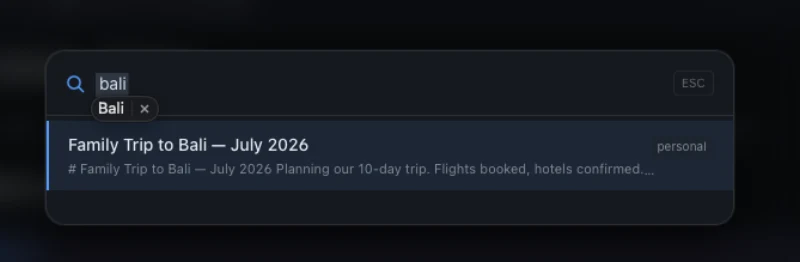
Search Everything in < 100ms
Press Cmd+K and find any note, password, or tag instantly. Search across everything you've saved, even with thousands of entries.
- Full-text search across notes and secrets
- Filter by tags, type, or date
- Fuzzy matching (handles typos)
Set up in 2 minutes. Seriously.
Create Your Vault
Pick a folder on your computer. Set a master password. That's it -you have a private, encrypted space for all your notes and passwords. No account creation, no email required.
Write Notes, Add Secrets
Write notes like you normally would. When you need to store something sensitive -a password, a credit card, a license key -lock it right inside the note. Only you can see it.
Search, Sync, Sleep Well
Find any note or password instantly with search. Every change is saved automatically with full history. Upgrade to Pro to sync across your devices.
Claspt replaces two tools with one.
| Feature | Password Managers | Notes Apps | Claspt |
|---|---|---|---|
| Free-form markdown notes | |||
| Encrypted secrets | |||
| Data format | Proprietary binary | Varies (often proprietary) | Markdown + JSON |
| Portability | Export as CSV | Export as PDF/MD | Native files, always portable |
| Git version control | Some (manual) | Built in | |
| Secret templates | Rigid forms only | Flexible + templates | |
| Browser autofill | Extension | ||
| Offline-first | Partial | Varies | Always |
| Self-hosted sync | Some | Git-based |
Browser autofill is available via the Claspt Browser Extension for Chrome, Edge, Brave, and Arc.
Everything you need. Nothing you don't.
Lock Sensitive Info Inside Notes
Passwords, credit cards, and private info are encrypted right inside your notes. Reveal with your fingerprint or master password. Auto-locks when you step away.
Beautiful Notes Editor
Write with headings, bold, links, tables, checklists, and more. Visual or text mode. Keyboard shortcuts for everything. Feels like a real writing app.
Find Anything Instantly
Search all your notes and passwords in milliseconds. Type a few letters and results appear immediately. Never lose track of anything again.
Never Lose a Change
Every save is automatically tracked. See what changed, when, and roll back to any previous version with one click. Your notes have a complete history.
Biometric Unlock
Unlock your vault with Touch ID, Face ID, or Windows Hello. Fast access without typing your master password every time. Hardware-backed security.
Sync Across Devices
Access your passwords and notes on all your computers. Everything is encrypted before it leaves your device. Available on Pro and Pro+ plans.
Share Passwords Safely
Send a password or note to someone with a self-destructing link. Set it to expire after one view or a time limit. They don't need a Claspt account.
20 Themes
Nord, Dracula, Catppuccin, Tokyo Night, GitHub Dark, Everforest, Kanagawa, and 13 more. Your vault, your aesthetic. Switch themes instantly from the command palette.
Works with AI Tools
Connect Claspt to AI assistants like Claude, Cursor, and Windsurf. They can search your notes while your passwords stay locked. Great for developers.
15 Built-in Extras
Diagrams, charts, kanban boards, spreadsheets, math formulas, and more -all built into the editor. No plugins to install.
Password Generator
Generate strong passwords, memorable passphrases, or PINs. Built-in strength checker tells you if your password is weak. Create and save in one step.
For developers: connect your AI tools.
If you use AI coding assistants like Claude, Cursor, or Windsurf, Claspt can give them access to your notes while keeping your passwords locked. This section is for developers -skip it if that's not you.
Connect
Add Claspt's MCP server to Claude Code, Cursor, or Windsurf. One config line. No plugins, no extensions.
Store
AI agents save project context, decisions, and conversation summaries as encrypted vault pages and memory entries.
Recall
Next session, your AI reads back its context from the vault. No re-explaining. No lost decisions. Persistent memory across conversations.
Two-Tier Tokens
Give agents a clsn_ notes token for full read/write access to pages, while your secrets stay locked behind a separate clss_ token. Automatic redaction of secret blocks on notes-scoped requests.
Agent Memory Store
Persistent key-value storage at /api/memory/:namespace. AI agents store and retrieve context across sessions -with automatic TTL cleanup and encrypted vault-level protection.
Secret Access Approval
Optional approval popup when an agent requests secret-scoped access. 30-second timeout, “remember for session” option. You stay in control.
Works Everywhere
MCP server, HTTP API, CLI, and inbox folder. Claude Code, Cursor, Windsurf, Gemini CLI, custom scripts -anything that speaks JSON-RPC or HTTP.
Your data stays private. Period.
Everything sensitive is encrypted on your computer before it goes anywhere. We can't read your data -and neither can anyone else. Built with the same encryption standards used by banks and governments.
Bank-Grade Encryption
Your passwords and secrets are scrambled using the same encryption standard (AES-256) that banks and governments use. Nobody can read them without your master password.
One Password to Remember
Your master password unlocks everything. It's processed through advanced security algorithms that make it extremely difficult for anyone to guess -even with powerful computers.
Built for Safety
The security engine is built with Rust -a programming language specifically designed to prevent the kind of bugs that cause data breaches in other software.
Safe Even When Syncing
When you sync across devices, your passwords are encrypted before they leave your computer. Even if the cloud storage is hacked, your secrets are unreadable.
What's encrypted vs. what's not
Encrypted
- Passwords, credit cards, and private data
- Labels on your locked items
- File attachments
Plaintext (By Design)
- Note titles and body text (so you can search them)
- Folder names and tags
- Change history timestamps
Why plaintext for non-secrets? Because full-text search, Git diffs, and grep all require readable text. Encrypting everything would break the features that make Claspt useful. Your passwords and sensitive info are the only things that get encrypted, and they get bank-grade protection.
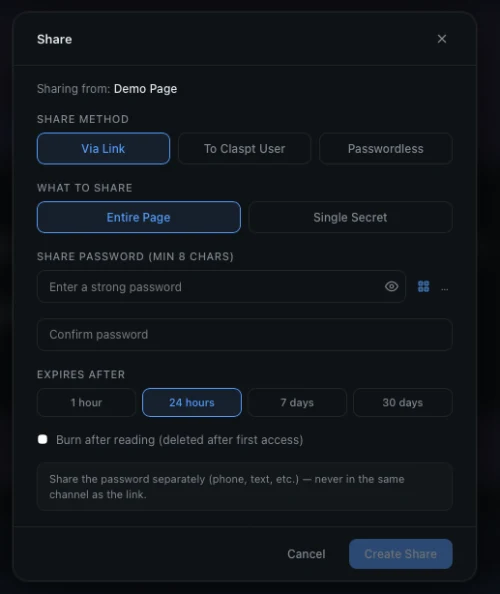
Password-protected sharing with expiry and burn-after-reading.
Built for people who think in context.

Developer
"My deploy notes reference the exact API keys they need. No more tabbing between 1Password and Notion."
- API keys embedded in architecture docs
- SSH configs alongside server notes
- Git version history for every change
- Cmd+K to find anything in milliseconds

Professional
"Client logins, meeting notes, contract details, all in one place per project. No more hunting through email."
- Client vaults with project-specific secrets
- Meeting notes with embedded access codes
- Portable: switch laptops without migration pain
- Offline access for travel and client sites

Privacy-Conscious Individual
"No cloud accounts. No tracking. My data stays on my machine. I can verify the encryption because the code is open."
- No account required. No email, no phone number
- Works entirely offline
- Self-hosted sync for the paranoid (in a good way)
- Open file format, no vendor lock-in

Small Business Owner
"Shared wifi passwords, vendor logins, bank details, all documented with context for my team."
- Business credentials with usage notes
- Vendor contacts with login details inline
- SOP documents with embedded access credentials
- Team sharing via Git (Pro+ feature)
Free forever on desktop. Pro when you need sync.
Free
Everything you need on a single device.
- Unlimited notes and secrets
- AES-256-GCM encryption
- Full markdown editor
- 20 themes · biometric unlock
- 1 device
Pro
Google Drive sync. Mobile. Sharing.
- Everything in Free
- Google Drive sync (BYOS)
- Mobile apps (iOS + Android) Coming Soon
- Sharing · import · 5 devices
Pro is launching soon — leave your email for an early-access invite.
Pro+
Hosted encrypted sync. Real-time push.
- Everything in Pro
- 1 GB hosted encrypted storage
- WebSocket real-time sync
- 5 devices · priority support
14-day free trial. No credit card required.
Frequently Asked Questions
What happens when my Pro+ trial ends?
You keep full access to all your notes and secrets on desktop. Sync and mobile access stop working until you subscribe. No data is ever deleted.
What's the difference between Pro and Pro+?
Pro+ ($8/mo) is live now — 1 GB hosted encrypted storage with real-time WebSocket push sync, up to 5 devices, and priority support. Pro ($4/mo) is the upcoming BYO Google Drive tier — leave your email on the pricing page to get notified.
Is the free plan really free forever?
Yes. The desktop app with unlimited notes, secrets, encryption, search, and Git versioning is free forever. We make money from Pro subscriptions, not from locking basic features behind a paywall.
Can I share secrets with someone?
Yes, with Pro or Pro+. Create password-protected shared links with expiry and burn-after-reading. The secret self-destructs after it's viewed once.
How do you pronounce "Claspt"?
It rhymes with "grasped" — one syllable, /klæspt/. It's the archaic past tense of "clasp," as in "she claspt the locket shut." Your notes and secrets, claspt together.
Small, fast, and private.
Tauri + Rust, not Electron
Around 30 MB on macOS, not the 200 MB+ of bundled Chromium that comes with Electron apps. Tens of megabytes, not hundreds.
No Account Required
Download, open, create a vault. No email. No phone number. No verification. No "sign in with Google." Just you and your data.
Your Data Stays Yours
Your vault is a folder on your filesystem. Markdown files you can read with any text editor. No cloud requirement. The app has no telemetry, no analytics, and no ads -what you do in your vault stays on your device.
Keyboard-First
Command palette. Vim-style shortcuts. Cmd+K for search. Cmd+Shift+S for secrets. Cmd+/ for slash commands. Your hands never leave the keyboard.

Your vault is waiting.
Free download. No account. Start in 30 seconds.
Or start your 14-day Pro+ trial for hosted real-time sync.

Coming from another tool?