
Everything your passwords and notes need.
Write notes, store passwords, generate strong credentials, search everything, share safely, and sync across devices. All built in. No plugins.
Security
Search & Organization
Version Control
Sync & Sharing
Import & Export
Encrypt anything, anywhere in your notes.
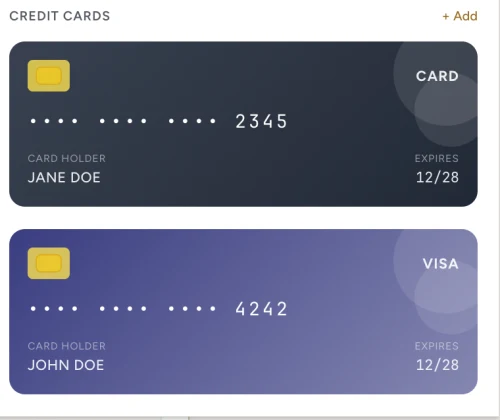
Most password managers force you into rigid form fields: a title, a username, a password. Claspt works differently. You write notes like you normally would, and when you need to store something sensitive, you drop in a secret block right where it belongs. A login next to your setup instructions. An API key inside your project documentation. A credit card alongside your subscription tracker.
Each secret block is individually encrypted with AES-256-GCM, the same standard used by banks and governments. Click a secret to reveal it with your master password or fingerprint. When you close it, the plaintext is wiped from memory. Everything else on the page stays readable and searchable. Only the sensitive parts are locked.
8 built-in templates
Key behaviors
- Click to reveal, click to copy
- Auto-hides after 30 seconds
- Clipboard cleared after 30 seconds
- Unique nonce per block, so no two encrypted alike
A real editor, not a "notes field."
Password managers give you a tiny text box for notes. Claspt gives you a full markdown editor with headings, lists, tables, code blocks, checklists, images, and links. Write documentation alongside your credentials. Keep setup guides next to server passwords. Build runbooks with embedded secrets.
The editor supports split view (write on one side, see the rendered preview on the other), auto-save every 2 seconds, and slash commands for quick formatting. It handles 50+ programming languages with syntax highlighting, so your code snippets look as good as your prose.
Find anything in under
100 milliseconds.
When you have hundreds of pages and credentials, finding what you need has to be instant. Press Cmd+K (or Ctrl+K) from anywhere in the app and start typing. Results appear as you type. Claspt searches across page titles, content, tags, and even secret labels simultaneously.
The search engine runs entirely on your machine. Nothing is sent to the cloud. It's smart enough to rank results by relevance (titles matter more than body text), and you can narrow results to a specific folder, only secrets, or a particular tag. Even vaults with thousands of pages return results in under 100 milliseconds.
Title 3x, Tags 2x, Secret labels 2x, Body 1x
Search within a folder, a tag, or across everything
Keyboard-first. Open search from anywhere instantly
Every save is a commit.
Every change is recoverable.
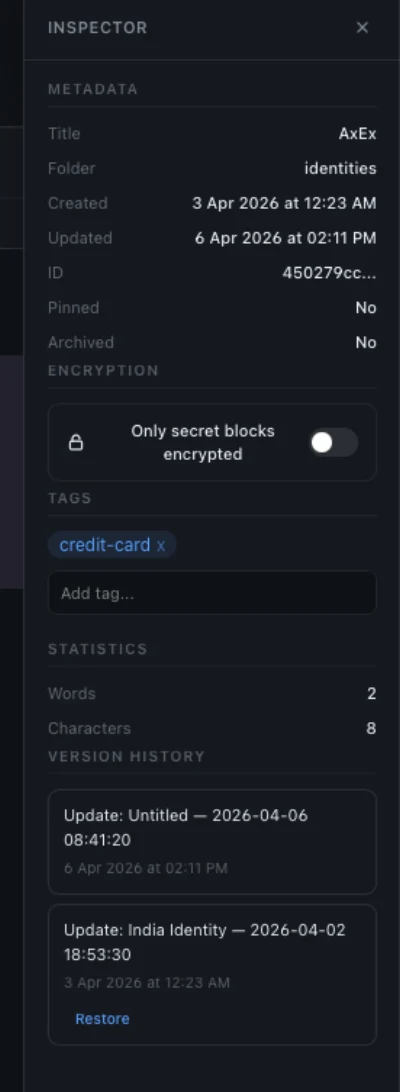
Ever accidentally deleted something important from a note and wished you could undo it? Claspt automatically saves a snapshot of every page every time you make a change. You can browse the full history of any page, see exactly what changed between versions side by side, and restore any previous version with one click.
This works even for deleted pages. The history preserves everything. Under the hood, Claspt uses Git (the same version control system developers use for code), so your history is robust, portable, and not locked into a proprietary format.
- Auto-commit on every save, no manual steps
- Full version history with date, time, and diff
- One-click rollback to any previous version
- Push to remote git repos Pro
Your face or your fingerprint.
Your choice.
Typing your master password every time you want to reveal a secret gets old fast. With biometric unlock, you can use Touch ID, Windows Hello, or a fingerprint reader instead. One touch to reveal a password, one touch to unlock the vault. It's the same security level. Your operating system handles the biometric check and releases your encryption key only after verifying it's really you.
Claspt never sees or stores your biometric data. That stays entirely with your operating system's secure hardware (Apple's Secure Enclave, Windows TPM, or Linux's fprint). You can choose how much biometric access to grant: use it only for revealing individual secrets, or let it unlock your entire vault.
Three modes
Password only (classic mode)
Biometric to reveal secrets only
Biometric unlocks the entire vault
RecommendedYour vault, on every device.
Use Claspt on your work laptop, your home desktop, and your personal machine, all with the same vault, always in sync. Pro+ ($8/mo) is live today — hosted encrypted cloud storage with WebSocket real-time sync, up to 5 devices, and 1 GB of storage. Pro ($4/mo, bring your own Google Drive) is on the way. Free users can still use self-hosted Git remotes for manual sync.
Your secrets are always encrypted before they leave your device. The sync provider only ever sees encrypted data. Even if someone gained access to your Google Drive, Git remote, or Claspt's servers, they cannot read your secrets without your master password.
Sync through Google Drive across up to 5 devices. Your vault stays encrypted in your own Google account.
Hosted end-to-end encrypted storage, up to 5 devices and 1 GB. Setup: Settings > Sync > Enable > verify via email OTP. Works immediately.
Edit a page, your change is on the server within ~20 seconds — no Sync now button required. Rapid edits collapse into a single server version after a short idle pause, keeping version history clean. Three save states (Unsaved / Saving / Saved) make the status obvious in the title bar.
Setting up a new device? Click "Restore" on the unlock screen, verify via OTP, enter your master password, and your vault syncs from the cloud.
Secret blocks are encrypted before they leave your device. Your sync provider stores ciphertext only. They cannot read your secrets even with full access to your files. The server never has your decryption key.
Bring your secrets from anywhere.
Switching password managers is usually painful: export gymnastics, incompatible formats, lost data. Claspt makes it straightforward. Export from your current tool (most support CSV), drag the file into Claspt, review the preview, and import. Your credentials become encrypted secret blocks inside Claspt pages, organized the same way they were in your old tool.
The import process preserves titles, usernames, passwords, URLs, and notes. After import, you can enrich each entry with the documentation and context that your old password manager's tiny notes field could never hold.
Import: How it works
Export from your current manager in CSV or native format
Drag the file into Claspt for automatic field mapping
Verify imported entries, fix any mapping issues
Securely delete the unencrypted export file
Export: Your data, your way
No lock-in, ever. Export everything from Settings → Export. Available on all plans, including free.
Password-protected .zip with all pages, folders, and decrypted secrets. Full vault backup.
CSV (compatible with 1Password, Bitwarden, KeePass, LastPass) or JSON for Claspt-to-Claspt transfers.
Import an entire folder of markdown files.
Moving from Obsidian, Bear, iA Writer, or any markdown-based app? Select a folder, and Claspt imports every .md file in one step. Folder structure is preserved, frontmatter titles are extracted, and any credentials detected in your notes are automatically encrypted as secret blocks.
Find it in Settings > Import / Export > Import Markdown Folder.
- Bulk import all .md files from a folder in one step
- Frontmatter title extraction: page names come from YAML frontmatter
- Automatic secret encryption: detected credentials become encrypted blocks
- Works with Obsidian vaults, Bear exports, iA Writer libraries, and any markdown folder
Select credentials. Right-click. Encrypt.
Found passwords in your notes that should be encrypted? Select the text, right-click, and choose "Convert to Secret(s)". Claspt detects key-value pairs from ASCII tables, markdown tables, Key: Value lines, KEY=value env vars, and email / password patterns. Choose between "One Secret" or "Separate Secrets", preview the output, and get auto-suggested labels from nearby headings.
- Detects credentials in 5+ common formats automatically
- Preview output before converting. Nothing changes until you confirm
- Auto-suggested labels from nearby headings for quick organization
- One Secret or Separate Secrets: group or split as you prefer
Restore from a vault export.
Previously exported your vault as a .zip archive? Import it directly back into Claspt. Select the file, enter the export password (if encrypted), and all pages are restored with their original folder structure intact.
Find it in Settings > Import / Export > Import from ZIP.
- Import password-protected .zip exports from Claspt
- Original folder structure preserved on import
- Complements the vault export feature for full backup/restore workflow
Three ways to share.
Pick the right one.
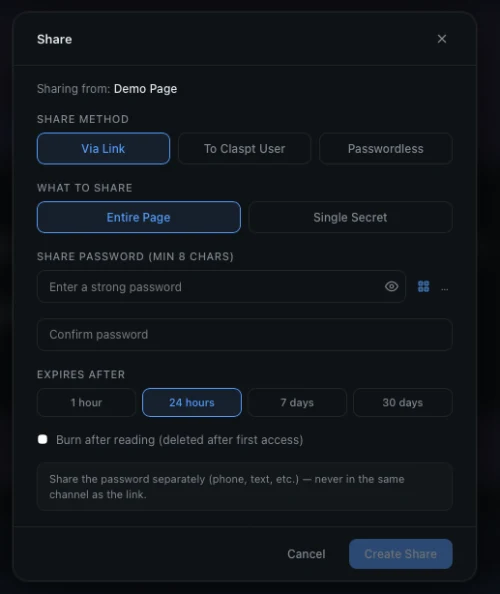
Need to send a Wi-Fi password to a guest? Share a server credential with a colleague? Hand off API keys to a freelancer? Claspt gives you three sharing methods so you can pick the right trade-off between convenience and control.
Generate an encrypted link, share the password separately. No Claspt account required on the recipient's end.
Enter the recipient's email, and they get an access code by email and import the shared content directly in their Claspt app.
Enter the recipient's email, and they click "Import" in their app and it just works. No password visible anywhere. Recipients see an "Auto" badge on incoming passwordless shares.
- Share entire pages or individual secret blocks
- Configurable expiry: 1 hour, 24 hours, 7 days, or 30 days
- Burn-after-reading: auto-delete after first access
- Email notifications when a share is accessed (optional)
- No third-party service. Shares go through the Claspt relay, encrypted end-to-end
- Rich incoming share cards: preview content before importing, expiry countdown, burn-after-reading indicators
20 themes. Your vault, your aesthetic.
You will spend a lot of time in your vault, so it should look the way you want. Claspt ships with 20 handcrafted themes, from the soft pastels of Catppuccin Latte to the deep blues of Tokyo Night to the classic contrast of Solarized. Every theme covers the entire interface: editor, sidebar, preview, and dialogs. Switch instantly from Settings or the command palette. No restart needed.
All 20 themes are free on every plan. We do not lock aesthetics behind a paywall.
Your vault, connected to everything.
Claspt is not just a place to store things. It is a building block for your workflow. AI tools like Claude, Cursor, and Windsurf can read and write your vault directly through the built-in MCP server. Scripts and automations can access your credentials through the REST API or CLI. Drop a markdown file into the Inbox folder and it is automatically imported, indexed, and version-tracked.
All four integration surfaces run locally inside the desktop app. There is no separate server to install, no cloud dependency, and no weakened security. The same encryption that protects your vault in the editor protects it through the API. Lock the vault and every integration endpoint shuts down instantly.
.md files in: auto-imported, indexed, version-tracked AI memory & scoped access New in v1.0
Scoped clsn_ (Notes) and clss_ (Secrets) tokens. Notes-scoped tokens auto-redact secret values.
Persistent key-value storage at /api/memory/:namespace with TTL auto-cleanup. Give Claude, Cursor, or Windsurf persistent context across sessions.
Optional popup when agents request secret-scoped access. 30s timeout, “remember for session” option.
Claspt runs in your system tray, keeping the API and MCP server available even when the window is closed.
Security guarantees
- Vault lock = API lock. Lock your vault and all endpoints shut down instantly.
- Same encryption engine as the editor. One engine, not "API-grade" vs "app-grade."
- Localhost only (127.0.0.1). Bearer token auth. Not exposed to the network.
- Every API change is auto-committed with full version history.
All integration features are free across all tiers.
Markdown that does more.
Standard markdown gives you headings, lists, and bold text. Claspt extends it with 15 built-in rendering features that turn your notes into something much more powerful. Write a math equation and see it rendered beautifully. Describe a flowchart in text and see the diagram. Create a kanban board for project tracking, a spreadsheet for calculations, or a timeline for planning, all inside your encrypted vault.
Every extension is a toggle, not a plugin. All 15 are enabled by default — open a vault and everything just works. If you'd rather a calmer editor, switch any of them off in Settings; disabled extensions add zero overhead. Everything stays as plain text in your .md files, so your notes remain portable and readable in any text editor.
Science
- Math (KaTeX): inline & block formulas
- Chemical formulas
Diagrams
- Mermaid: flowcharts, sequence diagrams
- Graphviz: directed graphs
- Charts: bar, line, pie via Chart.js
Planning
- Kanban boards: drag-and-drop
- Timelines: project visualizations
- Spreadsheets: editable grids with formulas
Writing
- Callouts: styled alerts & admonitions
- Footnotes, Wiki-links, TOC
Media
- Music notation: sheet music
- Embeds & Presentations
How it works
- Toggles, not plugins. Each extension has its own on/off in Settings
- All 15 extensions are enabled by default — switch off anything you don't want
- Lazy-loaded: disabled extensions add 0KB memory and 0ms startup
- Same rendering on every platform: macOS, Windows, Linux
All 15 extensions are free across all tiers.
Generate. Store. Forget the rest.
Stop reusing passwords. Stop trying to think of something clever. Claspt generates strong, unique passwords for every account: random characters, readable passphrases, memorable words, PINs, or UUIDs. Pick a mode, set the length, and click generate. The password goes straight into your encrypted secret block without ever touching your clipboard.
Every generated value is checked against a built-in strength meter that tells you exactly how strong it is and how long it would take to crack. If it is not strong enough, generate again with one click. Need passwords in bulk? Generate up to 1,000 at once and export them as CSV or JSON.
6 generation modes
k9#mP2!xNv&qL7$w Tiger-Moon-Cloud-Ripple bamuko-tivela 847291 f47ac10b-58cc-4372... Generate → Export Strength checker
- Entropy estimation with pattern penalties (repeated chars, sequential digits)
- Crack-time projection assuming 10¹² guesses/second (GPU cluster)
- Five-level scale: Very Weak → Weak → Fair → Strong → Very Strong
- Actionable improvement suggestions for weak passwords
Zero-exposure workflow
- Inline insert: generated values go directly into encrypted fields, never touching the clipboard
- Clipboard auto-clears after 30 seconds if you do copy
- Memory zeroing on all generated values after use
Available everywhere
- Desktop UI: generate button next to every secret field
-
CLI:
claspt generate password --length 24 -
HTTP API:
POST /api/generate/password - MCP Server: let AI tools generate passwords for you
The generator is free across all tiers.
Give AI agents a secure memory.
If you use AI coding tools like Claude, Cursor, or Windsurf, Claspt can be their secure memory. The built-in MCP server lets your AI assistant search your notes, read project documentation, and retrieve credentials, all without you copying and pasting back and forth. Ask your AI "what is the AWS production key?" and it pulls it directly from your vault.
Your secrets stay protected throughout. AI tools can only access what you allow, and you can require approval popups before any secret is revealed. The MCP server runs locally on your machine. No data is sent to third-party servers. When you lock your vault, all AI access stops instantly.
What AI agents can do
Create rich markdown pages with headings, code blocks, tables, and media
Store API keys, credentials, and sensitive data in AES-256-GCM encrypted secret blocks
Full-text search over page titles, content, tags, and secret labels (values stay encrypted)
Key-value storage at /api/memory/:namespace with TTL auto-cleanup, so agents remember context across sessions
AI tools can generate and store strong credentials inline
Security built in
Scoped clsn_ (Notes-only) and clss_ (Secrets) tokens. Notes tokens auto-redact secret values.
Optional confirmation when agents request secret-scoped access (30s timeout, "remember for session")
All communication stays on your machine. No data ever leaves your device.
Also accessible via Local HTTP API (23 REST endpoints), CLI tool (pipe-compatible JSON output), and an inbox folder that auto-imports dropped .md files.
Your vault, on every device.
Claspt runs natively on macOS, Windows, and Linux, not as a web app pretending to be desktop software. The app is built with Tauri and Rust, which means it is fast (launches in under a second), lightweight (around 30 MB on macOS — tens of megabytes, not the hundreds Electron apps weigh in at), and does not bundle a hidden copy of Chrome like Electron apps do.
Your vault is the same everywhere: the same markdown files, the same encryption, the same features. The browser extension auto-fills passwords in Chrome, Edge, Brave, and Arc from your desktop vault. Mobile apps for iOS and Android are in development.
Desktop App
Full-featured native app with the editor, utilities, and all integrations.
Mobile App Pro
Access your vault on the go. React Native with native crypto and biometric unlock.
Browser Extension
Auto-fill, save, and generate passwords in the browser. Connects to your desktop vault via Local API.
Requires Desktop app running
CLI & API
23 REST endpoints, CLI tool, MCP server, and inbox folder watcher.
Six tools that keep your vault healthy.
Your vault grows over time, and things can get messy. The Utilities panel gives you six tools to keep it healthy: scan for weak or reused passwords, check if any credentials have appeared in known data breaches, find duplicate entries, manage your tags in bulk, consolidate scattered credentials by domain, and get a full statistical overview of your vault.
Everything runs locally on your device. The breach checker uses k-anonymity, which sends only a tiny hash prefix to the breach database, never your actual password. Your full password hash never leaves your machine.
6 built-in tools
Total pages, folders, secrets, tags, vault size, average secrets per page, top tags
Analyzes all stored passwords for strength (score 0–4) and detects reuse across secrets
Fuzzy-matches labels, usernames, and URLs using Jaro-Winkler similarity (0.85 threshold)
Checks passwords against Have I Been Pwned using k-anonymity (SHA-1 prefix only leaves your device)
Lists all tags with usage counts, supports rename, delete, and merge across all pages
Groups credentials by domain, previews a consolidation plan, then merges into organized pages
All utilities run entirely on-device. Breach Check uses the k-anonymity protocol, so your full password hash never leaves your machine.
Scattered credentials? One click to organize.
After importing from another password manager, you often end up with scattered entries: three separate pages for the same website, each with slightly different credentials. The Consolidation tool groups your credentials by domain and shows you exactly where the duplicates are.
Review the suggested merges, pick which credentials to keep, and consolidate them into a single organized page. It is the cleanup step that makes your vault actually useful after migration, not just a dumping ground of imported data.
How it works
- Select source folders: toggle which folders to scan with visual pills showing selection count
- Preview plan: see exactly which secrets will be grouped by domain before executing
- Smart merging: if a page with the same domain already exists, secrets are appended rather than creating duplicates
- Source cleanup: original pages and empty folders are automatically removed after successful consolidation
- Result summary: pages created, merged, secrets moved, and source items cleaned up
Go back in time. Restore any version.
Accidentally deleted an important page? Need to recover a secret you removed last week? Git Restore lets you browse your vault's complete history and bring back any deleted page or previous version. Since Claspt saves a snapshot on every change, nothing is ever truly lost.
Select a point in time, preview what the page looked like at that moment, and restore it with one click. The restored page appears alongside your current vault. It does not overwrite anything.
Three ways to restore
Review exact changes between versions, then click "Restore this version"
Each version history entry shows a "Restore" button for one-click restoration
Editor and inspector refresh instantly to show the restored content and updated history
Restore is non-destructive. The original version is always preserved in Git history.
Save, autofill, and generate.
Right in the browser.
The Claspt browser extension saves you from the copy-paste dance. When you visit a login page, Claspt detects the form and offers to fill your saved credentials. When you sign up for a new service, it captures the credentials and saves them to your vault. When a password field appears, it generates a strong replacement right there in the page. Available now for Chrome, Edge, Brave, and Arc.
The extension connects directly to the Claspt desktop app's local API, so your credentials never pass through our servers or any third-party service. The extension is a helper that reads from your desktop vault, so the desktop app must be running. It is free for all users, including those on the free plan.
Password autofill
A small Claspt icon appears inside password fields; click to autofill from matching credentials
Automatically suggests credentials stored for the current site
Credential capture
Captures credentials from both traditional forms and SPA login flows (button clicks, Enter key, DOM removal)
Slide-down notification asking to save, update, or ignore credentials (like Bitwarden/1Password)
Only prompts "Update" when the submitted password differs from what's stored
Pending save prompts survive page redirects via chrome.storage.session
Per-domain preference to stop prompting for sites you don't want to track
Manage credentials in the popup New in v2.0
The popup is no longer just a "fill" surface. Edit, rename, move, or delete credentials directly — without opening the desktop app.
Username, password, TOTP, URL, and any custom fields. Save preserves notes / TOTP / URL / custom fields — changing one thing never disturbs the others.
Fill a credential, submit a form with a different password, and the save bar offers "Update password for X". One click rotates only the password.
From the row context menu — with a "+ New folder" inline option for moves. Rename and Move use proper inline forms now, not native browser prompts.
Mark one as primary (auto-fill prefers it; ★ pill); retire legacy logins as deprecated (dimmed, dropped from default tiers); pin & last-used sort across popup and inline picker.
Per-row badge plus a banner with the total count when the same password is used on more than one login. Hashed locally with Web Crypto — passwords never leave the device.
If the desktop changed the same credential since the popup loaded, the edit reverts cleanly with a clear banner instead of silently overwriting.
Built-in extras
- Inline password generator: generate strong passwords directly in form fields
- Generation history: per-login view inside each row, global view under Generator → History. Masked by default with eye-toggle reveal, configurable retention (default 7 days), stored locally only.
- Per-item URL match policy: Base domain / Exact hostname / Exact URL / Never auto-fill
- TOTP generation: auto-fill time-based one-time passwords
-
Clickjacking-hardened inline picker: closed shadow DOM with
all: initialisolation, refuses to render in cross-origin iframes
Two levels of lock. Your choice.
Not every lock needs to be a vault door. Claspt gives you two levels of protection. Screen Lock hides the interface when you step away but keeps the API and browser extension running in the background, so your integrations keep working. Key Lock is the full lockdown: it wipes the encryption key from memory entirely, and nothing works until you re-enter your master password.
You can configure separate timers for each level. For example, Screen Lock after 5 minutes of inactivity, Key Lock after 30 minutes. Or trigger a manual Key Lock anytime you want total security: heading to a coffee shop, closing your laptop for the day, or handing your computer to someone else.
Screen Lock vs Key Lock
Hides the interface on inactivity. API, MCP, and browser extension continue working in the background
Zeros the master key from memory. All access requires re-authentication. Configurable timer (0–480 minutes)
The local API server starts on app launch (if enabled), so integrations work immediately after unlock
Zero the master key on demand at any time, without waiting for the timer
Secrets stay hidden. Even in the editor.
When you reveal a secret, the value is visible on screen, which is fine when you are alone, but risky during screen shares, presentations, or over-the-shoulder glances. Secret Value Masking replaces the actual text with dots or asterisks while still letting you copy the value to your clipboard with one click.
Toggle masking on or off per secret block. When masked, only you know what is behind the dots. Even if someone is watching your screen, they see nothing useful.
How masking works
- Editor masking: password values display as
••••••••in the markdown editor - Click-to-scroll: clicking any line in a secret block scrolls the corresponding SecretCard into view with a brief highlight
- Reveal on demand: toggle visibility per field in the SecretCard, copy to clipboard with auto-clear
Import from any password manager.
Not everyone uses a mainstream password manager. If your credentials are in a spreadsheet, a custom database export, or any tool that can export CSV, Claspt can import them. Map the CSV columns to Claspt fields (title, username, password, URL, notes), preview the results, and import.
This is also useful for importing credentials from browsers. Chrome, Firefox, Edge, and Brave all export saved passwords as CSV. Just export from your browser settings and import into Claspt.
Smart column detection
- Auto-detects title, username, password, email, URL, OTP, notes, and folder columns
- Column mapping editor: adjust roles with dropdowns (including "Skip" and "Field as-is") before preview
- Duplicate strategy: choose to skip, overwrite, or import as new with auto-numbered suffix
- Batch performance: single tantivy commit for the entire import; thousands of entries in seconds
Works with KeePass, Bitwarden, Dashlane, NordPass, Proton Pass, and any other CSV-exporting manager.
Fast, resilient, crash-proof.
Claspt is built with Rust for the backend and React for the interface, connected through Tauri. This is not a web app wrapped in Electron. It is a genuine native application. The result is an app that launches in under a second, uses about 80 MB of memory, and runs smoothly even with thousands of pages in your vault.
All encryption, file I/O, and search indexing happen on background threads, so the interface never freezes while your vault is being saved or searched. Writes are atomic (either the whole save completes or nothing changes), so a crash or power loss cannot corrupt your data.
Async everything
- HTTP requests, Argon2id KDF, search index rebuilds, bulk imports, encryption, and file I/O all run on background threads
- The UI never freezes, even during operations that take seconds
Data safety
- Atomic writes: temp-file + rename pattern prevents data corruption on crash
- Config backup/recovery: automatic
.bakbefore overwrite, falls back to backup then defaults on corruption - Search auto-rebuild: detects corrupted tantivy index, deletes and rebuilds from all pages automatically
Optimized binary
- LTO, strip, single codegen unit for ~60% binary size reduction
- Code splitting for heavy JS libraries (Mermaid, KaTeX, Chart.js, CodeMirror), loaded on demand
Ready to try Claspt?
Download the free desktop app or start a 14-day Pro+ trial. No credit card required.