

Claspt is now available on the Microsoft Store. This is a milestone I have been quietly working toward for months, and it matters for the practical reason that Windows users get a frictionless install with no SmartScreen warning, and Microsoft handles updates automatically in the background. Our Store build is a dedicated variant with the auto-updater compiled out at build time — smaller, quieter, and easier to manage.
What Claspt is, in one paragraph
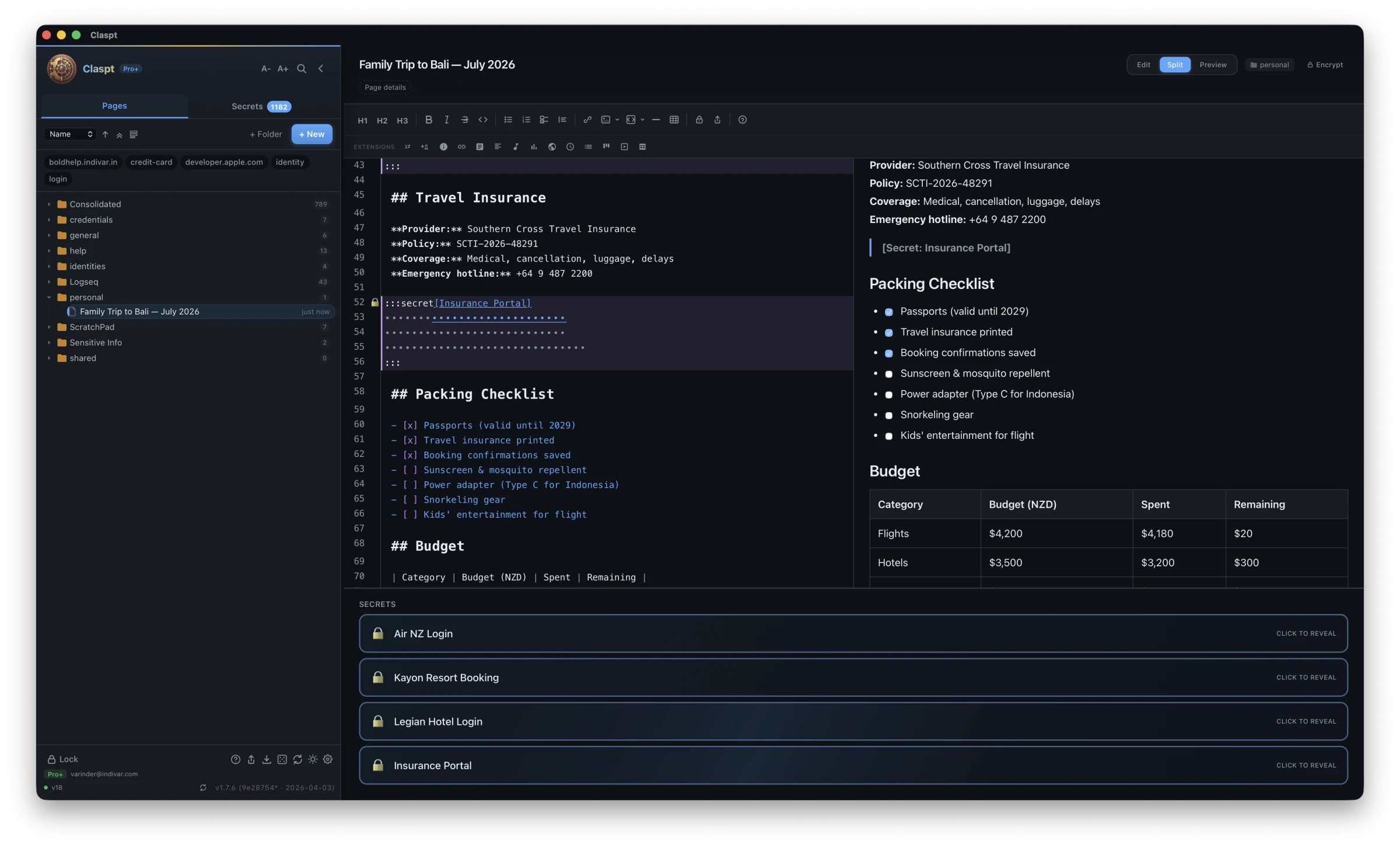
Claspt is a cross-platform encrypted personal vault that combines markdown note-taking with AES-256-GCM encrypted secret storage. Your notes live in portable .md files. Your passwords, API keys, credit cards, and anything else sensitive live inside those notes as inline :::secret[Label] blocks that get encrypted on save and decrypted only when you reveal them. Nothing on disk is ever plaintext. No cloud lock-in, no proprietary format — you can open a Claspt vault in any text editor and still read the prose around your secrets.
Why the Microsoft Store matters for the install experience
For Windows users, the practical difference between a Microsoft Store install and a direct .msi download is significant. Our direct-download installers are not code-signed yet, which means SmartScreen will flag them on first launch with a "Windows protected your PC" warning. Microsoft Store apps don't trigger that warning, install with one click, and update themselves silently in the background.
The Microsoft Store path also handles updates for you automatically — the Store build has the auto-updater compiled out at build time, so Microsoft is the only update source and you don't have to think about it. The binary itself is the same one we ship directly; the Store just gives Windows users a cleaner install path.
A purpose-built Store build
The Microsoft Store version of Claspt is not our regular binary repackaged. It is a dedicated variant with the auto-updater compiled out entirely at build time, not just runtime-disabled. Microsoft handles updates for Store apps, so the update-checking code and its network calls have no business being in the binary. The result is a smaller, quieter app:
- No background update checks
- No update-related network calls at all
- No telemetry of any kind
- Truly local-first — everything stays on your machine unless you explicitly enable sync
Direct-download users still get in-app updates because they need them — there is no Store to push a new version. Store users get updates through the Store itself, which is how Microsoft prefers it and how Store policy actually requires it.
What is in Claspt today
- AES-256-GCM encryption with per-block nonces and Argon2id key derivation
- Markdown-first: your notes are plain
.mdfiles with YAML frontmatter - Secret blocks: encrypted key-value pairs inline in your notes, decrypted only on reveal
- Full-text search via Tantivy on desktop and SQLite FTS5 on mobile
- Git versioning built in — every save is auto-committed, browse history and revert with one click
- Biometric unlock via Touch ID, Face ID, and Windows Hello
- Import from 1Password, LastPass, Bitwarden, RoboForm, KeePass, and plain CSV
- Export to ZIP archive with full vault portability — no lock-in, ever
- Native on every platform: Rust backend, shared crypto and git code across desktop and mobile via UniFFI (new in v1.7.26)
Store vs direct download — which should you use?
If you are on Windows, install from the Microsoft Store. It is the recommended path for three reasons:
- No SmartScreen warning. Our direct-download
.msiand.exeare not code-signed yet, so Windows SmartScreen flags them on first launch with a "Windows protected your PC" message. The Microsoft Store install path skips that warning entirely. Legitimate software with an unsigned installer looks the same to Windows as malware with an unsigned installer, and we'd rather not ask anyone to click through that screen for a password manager. - Automatic updates. Microsoft handles Store app updates in the background. You do not have to think about it — new versions arrive silently.
- Smaller, quieter binary. The Store build has the auto-updater compiled out entirely, so there is less code in the binary and zero background network activity related to updates.
If you still want the direct download (you run a locked-down environment, you want to verify the binary yourself with SHA-256, or you simply prefer not to use the Store), you can grab the .msi or .exe from our download page. Just know that the direct build is unsigned for now, SmartScreen will warn you, and updates are handled by the app itself rather than by Windows.
Where to get Claspt
| Platform | Channel | Status |
|---|---|---|
| Windows | Microsoft Store | Live now |
| Windows | Direct .msi / .exe | Unsigned — SmartScreen warning |
| macOS | Direct .dmg (signed & notarized) | Live now |
| macOS | Mac App Store | In review |
| Linux | AppImage / .deb | Live now |
| iOS | App Store | In review (v1.4.4) |
| Android | Google Play | In review (v1.4.4) |
| Browser | Chrome Web Store (Chrome, Edge, Brave, Arc) | Live — v1.5 (v1.7 in review) |
What is next
This release, v1.7.26, brings the Microsoft Store launch together with a major mobile refactor that moves all crypto, git, and sync code into a shared Rust crate (claspt-core) exposed through UniFFI. Mobile no longer runs any JavaScript crypto — every platform now encrypts and decrypts secrets using the exact same Rust code, audited once. You can read the full release notes on the changelog.
If you have been waiting for Claspt to land on your platform, today is the day. Install it from the Microsoft Store, try it for a week, and tell me what you think.
Install Claspt for Windows
Get the Store build — signed by us, distributed by Microsoft, updates handled automatically.
Open in Microsoft Store