
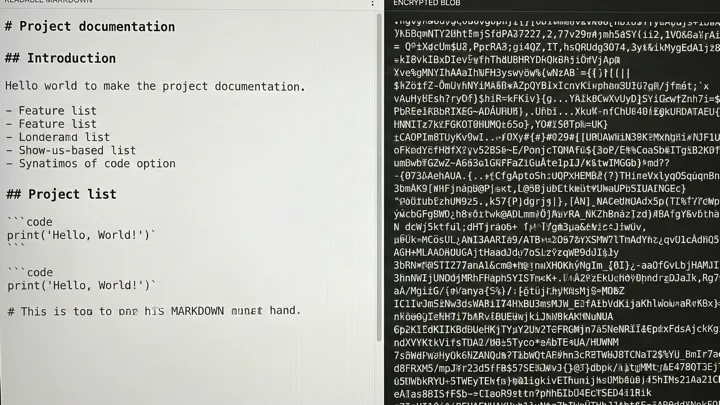
Claspt's default encryption model is surgical: only secret blocks are encrypted, everything else stays as plain markdown. But some pages need total protection. Full-page encryption (Pro) encrypts the entire page into a single ciphertext blob. Here is when to use each mode, and the trade-offs involved.
How Selective Encryption Works
By default, Claspt encrypts only the content inside :::secret blocks. Everything else — headings, notes, code blocks, lists, links — stays as readable markdown on your filesystem.
# Production Database             ← visible

## Connection Details                ← visible
PostgreSQL 16 on AWS RDS (us-east-1). ← visible

:::secret[Database Credentials]
enc:v1:aGVsbG8gd29ybGQ=...         ← ENCRYPTED
:::

## Migration Notes                   ← visible
Last migration: 2026-02-20           ← visible
An attacker with read access to your vault can see page titles, headings, and documentation text. They cannot decrypt the secret blocks without your master key.
How Full-Page Encryption Works
Toggle full-page encryption on a page, and the entire markdown file — every heading, every paragraph, every secret block — is encrypted into a single AES-256-GCM ciphertext blob.
enc:full:v1:U2FsdGVkX18AAAAAAAAAA...  ← entire page encrypted
(no titles, no headings, no content visible)
An attacker with read access sees an opaque blob. They cannot determine the page title, the type of content, or even the number of secret blocks.
When to Use Selective Encryption
Selective encryption is the right default for most pages. Use it when:
- You want searchable notes. Claspt's tantivy search engine can index plaintext content in under 100ms. Fully encrypted pages require decrypting into memory first, which is slower for large vaults.
- You want meaningful Git diffs. When you edit a selectively encrypted page, Git shows exactly which paragraph, heading, or list item changed. A fully encrypted page shows as one giant binary change — useless for review.
- The documentation is not sensitive. "This is the production database running PostgreSQL 16" is not a secret. The connection string and password are. Encrypt the secret, leave the documentation readable.
- You want portability. If Claspt disappears, your markdown notes are still readable in any text editor. Only the encrypted secret blocks need the master key.
When to Use Full-Page Encryption
Full-page encryption is for pages where everything is sensitive — not just the credentials but the context around them. Use it when:
- The page title itself is sensitive. A selectively encrypted page titled "Competitor Acquisition Analysis" reveals that you are analyzing an acquisition, even if the content is hidden. Full-page encryption hides the title too.
- Legal or compliance requirements. HIPAA, GDPR, or internal security policies may require that all patient data, personal data, or classified information be encrypted at rest — not just the "secret" parts.
- Private journal entries. A personal diary entry about your health, finances, or relationships deserves full protection. You do not want anyone seeing even the headings.
- Syncing through untrusted storage. If you use Google Drive sync, full-page encryption means Google sees nothing — not even your note titles.
- Incident response documentation. During a security incident, your analysis page may contain attacker indicators, compromised systems, and remediation steps that should all be classified.
The Trade-Off Table
Feature               Selective           Full-Page
─────────────────────────────────────────────────────────
Search                Instant (indexed)    Requires decryption
Git diffs             Meaningful           Opaque blob
Page title            Visible              Hidden
Non-secret content   Visible              Hidden
Portability           High (readable .md)  Requires Claspt
Sync visibility      Partial              Zero
Performance           Faster               Slight overhead
Tier                  Free                 Pro
A Practical Mix
Most users end up with a mix. Their vault might look like this:
- 90% selective encryption — project documentation, API credential pages, dev environment configs. The notes are readable, the secrets are encrypted.
- 10% full-page encryption — personal journal entries, financial planning notes, legal documents, incident response pages. Everything is locked.
This gives you the best of both worlds: fast search and useful diffs for most of your vault, with total protection where it matters.
How to Enable Full-Page Encryption
Full-page encryption is a Pro+ feature. To enable it on a page:
- Open the page in Claspt
- Click the lock icon in the page header (or use the page menu)
- Toggle "Full-page encryption" on
- The page is re-encrypted immediately and saved
You can toggle it back off at any time. Disabling full-page encryption decrypts the page back to the selective model — your secret blocks stay encrypted, everything else becomes plaintext.
Both Modes Use the Same Cryptography
Whether you use selective or full-page encryption, the underlying cryptographic primitives are identical:
- AES-256-GCM for authenticated encryption
- Unique 96-bit nonces per block or per page
- Master key derived via Argon2id (64 MB memory, 3 iterations)
- ring crate (Rust bindings to BoringSSL) for FIPS-validated primitives
- zeroize for wiping key material from memory after use
Full-page encryption is not "stronger" than selective encryption — it is wider. Both use the same unbreakable cipher. The difference is scope, not strength.
Try Claspt Free
Free on desktop with selective encryption. Pro adds full-page encryption for total privacy.
Download Free