
Sharing credentials has always been a pain. You generate a link, set a password, then somehow communicate that password to the recipient through a different channel. What if you could skip all of that? With Claspt v1.6.58, you can. Passwordless sharing lets you send secrets to other Claspt users with a single click — no password to remember, no link to copy, no second channel needed.
The Problem with Password-Protected Links
Think about what sharing a credential actually looks like today. You open your vault, find the secret, and generate a shareable link. You set a password on that link. You copy the link and send it to your colleague over Slack. Then you open a different channel — maybe a text message or a phone call — and tell them the password. On their end, they open the link in a browser, type in the password, and finally copy the credential into wherever they need it.
That is six steps and two communication channels just to hand someone a single API key or login. Every extra step is a place where things go wrong. People send the password in the same Slack thread as the link, defeating the purpose entirely. They write the password on a sticky note. They text it in plaintext. The friction of doing it properly means most people do not do it properly.
This is not a problem you can solve with better documentation or stricter policies. The process itself has too many moving parts. The only real fix is to remove the parts that cause friction.
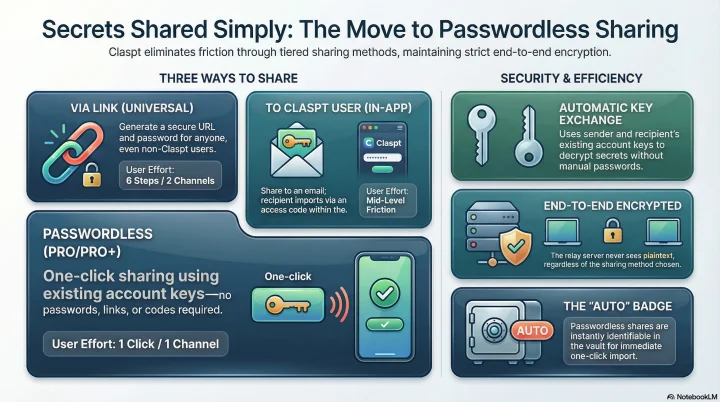
3 Ways to Share in Claspt
Claspt now offers three sharing methods, each suited to a different situation. Think of them as a progression — each one removes a layer of friction from the one before it.
1. Via Link
This is the universal method. Generate a URL, set a password, and share both with the recipient. It works for anyone, whether or not they use Claspt. The recipient opens the link in a browser, enters the password, and sees the secret. This is the method you use when sharing with someone outside your organization or someone who does not have Claspt installed.
2. To Claspt User
If the recipient has a Claspt account, you can share directly to their email address. They receive an access code by email, open Claspt, and import the shared secret in-app. No link to copy, no browser tab to open. The access code still needs to arrive separately, but the import happens inside the app where the credential will actually be used. This is simpler than a link, but there is still a code to deal with.
3. Passwordless (Pro/Pro+)
This is the headline feature. Enter the recipient's email address and click share. That is it. No password, no access code, no link. The recipient opens Claspt, sees the incoming share with an "Auto" badge, and clicks Import. One action on your end, one action on theirs.
Passwordless sharing is available on Pro and Pro+ plans. If you share credentials with teammates regularly, this alone is worth the upgrade.
How Passwordless Works
The reason password-protected sharing requires a password is that the recipient needs a way to decrypt the secret. Normally, you create that decryption key (the password) and communicate it out of band. Passwordless sharing eliminates this step by using the encryption keys that both sender and recipient already have in their Claspt accounts.
When you share passwordlessly, the Claspt relay handles a key exchange between your account and the recipient's account. The secret is encrypted in a way that only the recipient's existing keys can decrypt. No new password is generated, no code is emailed, and the relay server never sees the plaintext content. The recipient simply opens Claspt and imports the share — their app already has the keys it needs.
On the receiving end, passwordless shares are marked with an "Auto" badge so you can immediately tell them apart from shares that require a code. One click on Import, and the credential lands in your vault.
What the Recipient Sees
The recipient opens the share link in their browser. They see a minimal page with a password prompt — no Claspt branding clutter, no account creation required. They enter the password, and the content is decrypted in their browser. The plaintext never travels over the network.
Shared Secret

This content was shared securely via Claspt.
Enter the password to decrypt.

[Password: ••••••••••]  [Decrypt]

── after entering the correct password ──

host:      db-prod.internal.example.com
port:      5432
database:  app_production
user:      deploy_user
password:  xK9#mP2$vL7nQ4wR8jF1

Expires in 23 hours  ·  Burn after reading: ON
Once they close the page, the content is gone from their browser memory. If burn-after-reading is enabled, a second visit to the same link returns a "This share has been consumed" message.
When to Use Each Method
The choice is straightforward:
- Sharing with someone who does not use Claspt? Use Via Link. It works in any browser and requires nothing installed on the recipient's side.
- Sharing with a Claspt user and you are on the Free plan? Use To Claspt User. They get an access code by email and import in-app. Simpler than a link, no browser needed.
- Sharing with a Claspt user and you have Pro or Pro+? Use Passwordless. Enter their email, click share, done. They click Import, done.
In practice, if your whole team is on Claspt and you have Pro+, passwordless becomes your default. You stop thinking about how to share and just share.
When to Use Each Expiry
Expiry          Use Case
───────────────────────────────────────────────────────
1 hour          Pair programming session, live handoff
24 hours        Sharing with a teammate in the same time zone
7 days          External contractor onboarding, cross-timezone
30 days         Project handoff, long-running onboarding

+ Burn after reading    One-time root passwords, recovery codes
Still End-to-End Encrypted
Removing the password does not mean removing the security. All three sharing methods are end-to-end encrypted. The Claspt relay server facilitates the exchange but never has access to plaintext secrets. This is true for link-based sharing, code-based sharing, and passwordless sharing alike.
Expiry controls still apply to all methods. You can set a share to expire after a specific time or after the first view (burn-after-reading). These options work the same way regardless of which sharing method you choose. Passwordless sharing is about removing friction from the workflow, not removing safeguards from the security model.
Your device
   │  ← content encrypted with share password (AES-256-GCM)
   ▼
Claspt relay
   │  ← stores only ciphertext + expiry metadata
   ▼
Recipient's browser
   │  ← decrypts in-browser with share password
   ▼
Plaintext visible only in browser memory
   │  ← never written to disk, never sent over network
The difference is purely in the user experience. Instead of six steps across two channels, you get two steps in one app. The encryption underneath is just as strong.
Email Notifications
Optionally, enable email notifications on a share. When the recipient accesses and decrypts your shared content, you receive an email confirming:
- The share was accessed
- The timestamp of access
- Whether the content was successfully decrypted
This gives you an audit trail without requiring the recipient to have a Claspt account. If you shared a credential and never receive the access notification, you know the recipient has not picked it up yet — or that the link expired before they could.
Sharing vs. Collaboration
Claspt sharing is designed for one-way credential handoffs, not real-time collaboration. The distinction matters:
- Sharing — you send a snapshot of a credential or page to someone. They view it once (or until it expires). They do not get ongoing access. If you change the credential later, the share still contains the old value.
- Collaboration — a different feature (coming soon) that gives another Claspt user ongoing read or write access to a page in your vault. Changes sync in real time. That requires both parties to have Claspt accounts.
Sharing is simpler and more secure for the common case: "Here is the password, use it now, and the link self-destructs."
Try It
Passwordless sharing is available now in Claspt v1.6.58. If you are already on a Pro or Pro+ plan, you can start using it immediately — just choose "Passwordless" when sharing a secret to another Claspt user. If you are on the Free plan, the Via Link and To Claspt User methods are still available and still fully encrypted.
Sharing credentials should be as easy as sending a message. With passwordless sharing, it finally is.
Security Best Practices
Claspt sharing is secure by design, but you can make it stronger with these habits:
- Always send the password through a different channel than the link. Link via Slack, password via phone call. Link via email, password via Signal. This ensures that compromising one channel does not expose the credential.
- Use burn-after-reading for one-time credentials. Initial passwords, recovery codes, and root keys should not persist longer than necessary.
- Choose the shortest practical expiry. If the recipient is online, use 1 hour. There is no reason for a database password link to stay active for 30 days.
- Enable email notifications. Know when your share has been accessed. If the notification never arrives and the link expires, you know the recipient did not get it — and the credential was never exposed.
- Rotate the credential after sharing. For high-security credentials, change the password after the recipient has used the shared one to set up their own access. The shared link then contains a stale value even if somehow recovered.
Try Passwordless Sharing
Free on desktop. Pro+ unlocks passwordless sharing for your whole team. (A lighter Pro tier at $4/mo using your own Google Drive is coming soon.)
Download Free